Introduction
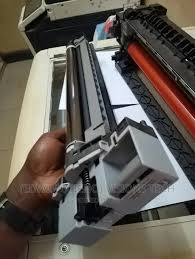
Mastering the Art of Drum Unit Servicing for Kyocera Ecosys 2030DN is an essential guide for anyone looking to maintain and enhance the performance of their Kyocera printing devices. In today’s fast-paced business environment, having reliable printing solutions is crucial, and this guide addresses the intricacies of drum unit servicing, ensuring that users can maximize their equipment’s lifespan and efficiency. Understanding these servicing techniques not only helps in reducing operational costs but also ensures high-quality prints at all times. At Techno-Drives, we recognize the need for comprehensive resources that cater to the specific needs of our audience, making this guide an invaluable asset for users and technicians alike.
Understanding the Drum Unit
The drum unit is a critical component in laser printers and multifunction devices like the Kyocera Ecosys 2030DN. It plays a pivotal role in the printing process, transferring toner to the paper to create text and images. A solid understanding of how the drum unit functions is vital for effective servicing. Users should know that a well-maintained drum unit can significantly influence print quality and machine longevity. Furthermore, recognizing the signs of wear and tear in the drum unit can lead to timely interventions, thereby preventing further complications and ensuring consistent print performance.
What is a Drum Unit?
A drum unit is a cylindrical component that holds an electrical charge, allowing toner to adhere to its surface. The process begins when the drum is exposed to a laser beam, forming a latent image that toner particles cling to as they roll across the surface. The image is then transferred to the paper under heat, resulting in a printed page. Understanding this mechanism will help users appreciate the importance of regular maintenance to avoid issues such as streaks or faded prints.
Importance of Drum Units in Printing
Drum units are essential for achieving high-quality prints, including sharp text and vibrant images. The performance of a drum unit can directly impact the overall output of the printer, making it crucial to replace or service them as needed. Regularly checking the drum unit and ensuring it is clean and free from damage can maintain print quality, ultimately saving time and resources. Users who prioritize drum maintenance will likely experience fewer printing troubles and longer-lasting devices.
Common Issues with Drum Units
Drum units can encounter several problems that affect print quality. Some of these include streaks on printed pages, fading colors, and complete failure to print. Understanding these common issues is crucial for effective servicing. Many users may not realize that improper handling during servicing can inadvertently damage the drum unit or compromise its lifespan. Recognizing these issues early can lead to simple solutions, preventing more significant malfunctions and ensuring productive printing sessions.
Servicing Frequency and Guidelines
Establishing a servicing schedule is vital for maintaining the optimal performance of the drum unit. Depending on usage, it is generally recommended to assess the drum unit’s condition every few thousand prints. Regular inspections allow users to note any signs of wear and take proactive measures. Creating a personalized servicing guideline can help users keep track of replacements and preventative maintenance, ensuring that their Kyocera Ecosys 2030DN continues to deliver outstanding performance over time.
When to Service the Drum Unit
Knowing when to service the drum unit is crucial for preventing printing issues. Users should look out for specific indicators, such as unusual noise from the printer, inconsistent print quality, or the appearance of spots and streaks on the pages. Typically, manufacturers provide guidelines on the expected lifespan of the drum unit, which can serve as a good benchmark. However, monitoring the printing environment and usage patterns can further enhance the servicing schedule, ensuring that maintenance occurs right on time.
Steps for Effective Servicing
Effective servicing of the drum unit involves several critical steps. First, users should turn off the printer and unplug it to ensure safety. Next, carefully remove the drum unit, ensuring minimal exposure to light to preserve its longevity. Cleaning the unit with a soft, lint-free cloth and checking for any damage are essential steps. If significant wear is evident, replacing the drum is recommended. Following these steps can lead to enhancements in print quality and prolong the life of the drum unit.
Documentation and Records
Keeping a detailed record of servicing activities is beneficial for maintaining the drum unit’s performance. Users should document the date of service, any replacements made, and the condition of the drum unit. This information can help identify patterns in wear and tear and establish a more effective servicing schedule. By monitoring these records, users can make better-informed decisions about when to replace their drum units, maximizing efficiency and minimizing costs.
Preventative Maintenance Tips
To prolong the lifespan of the drum unit and enhance performance, implementing preventative maintenance tips is essential. Simple actions like regularly cleaning the printer and drum unit, using high-quality toner, and maintaining an appropriate printing environment can significantly contribute to the overall health of the printer. Additionally, avoiding overuse and allowing the printer to rest can help prevent overheating issues associated with prolonged operation, ensuring that the Kyocera Ecosys 2030DN remains effective for years to come.
Cleaning the Drum Unit
Cleaning the drum unit is a straightforward process that can help improve print quality. Users should avoid using harsh chemicals and instead opt for recommended cleaning solutions or damp cloths. Regularly cleaning the drum unit removes dust and toner buildup, which can cause print issues. Even simple regular cleaning can lead to a noticeable enhancement in output quality and reliability, making it a vital component of any ongoing maintenance plan.
Choosing Quality Toner
Using high-quality toner is critical for maintaining the health of the drum unit. Poor quality toner can lead to excess residue buildup, which can negatively impact print quality and the longevity of the drum unit. Users should always choose OEM or certified toners specifically designed for the Kyocera Ecosys 2030DN. Investing in quality toner not only ensures better prints but also significantly reduces the risk of operational issues stemming from inferior products.
Optimal Operating Environment
The operational environment in which the printer is situated plays a significant role in its performance. Factors such as humidity, temperature, and dust levels can impact the drum unit’s effectiveness. Ideally, the printer should be placed in a controlled environment, away from direct sunlight and temperature extremes. This attention to the printing environment safeguards the printer against potential issues related to harsh conditions that could lead to decreased performance or premature component failure.
Replacing the Drum Unit
Eventually, every drum unit will need to be replaced, and understanding when and how to do this is crucial. Users should refer to the printer’s manual for specific replacement guidelines and determine the best quality replacements available in the market. A timely replacement can prevent print quality issues and ensure uninterrupted functionality, which is vital for any business operation relying on efficient printing outputs. Knowing these replacement protocols allows users to avoid unnecessary downtime in their printing processes.
Indicators for Replacement
Recognizing when to replace the drum unit is vital for maintaining effective printing operations. Users should be aware of common indicators such as noticeable declines in print quality, lines or streaks appearing on documents, or unusual noises during operation. Manufacturers often provide guidance on expected drum life, but paying attention to these signs can help in making informed decisions about replacements, ensuring the Kyocera Ecosys 2030DN consistently delivers high-quality results.
How to Properly Install a New Drum Unit
Installing a new drum unit should be done with care to avoid damaging the printer or the new component. Begin by following the manufacturer’s instructions, ensuring that all connectors are aligned correctly. Users must avoid touching the surface of the new drum to prevent damage to its photosensitive layer. Gently sliding the new unit into position and ensuring it clicks into place properly will help users avoid future printing problems and ensure smooth operation.
Disposing of Old Drum Units
Proper disposal of old drum units is essential for environmental sustainability. Users should consult local regulations and manufacturer guidelines on disposal methods. Many manufacturers offer recycling programs for used drum units, allowing users to contribute to environmental conservation. Following these protocols not only adheres to regulations but also reflects a commitment to responsible practices, ensuring that users can maintain their devices without harm to the environment.
Conclusion
Mastering the Art of Drum Unit Servicing for Kyocera Ecosys 2030DN is vital for ensuring the longevity and efficiency of your printing device. By understanding the components of the drum unit, establishing a reliable servicing schedule, and implementing preventative maintenance measures, users can significantly enhance their printing experience. The above insights into servicing frequency, cleaning procedures, and replacement strategies provide practical recommendations for maintaining optimal performance. At Techno-Drives, we emphasize the importance of education and awareness in preserving your printing devices, enabling all users to navigate the complexities of drum unit servicing effectively.